Authentik
Authentik is a platform that allows us to join multiple login methods in a single, centralized IdP platform. It allows users to login into multiple internal applications, like this wiki, while also handling permissions and security.
To access the management interface, login into Alacrity Authentik and click the Admin interface big blue buttom on the top-right corner.
User management
Alacrity users will apprear in the Admin interface of Authentik, under Directory -> Users on the left sidebar.
All the Google-sourced accounts will be in the google-workspace path. From there, we can inspect or modify a user by clicking on it:
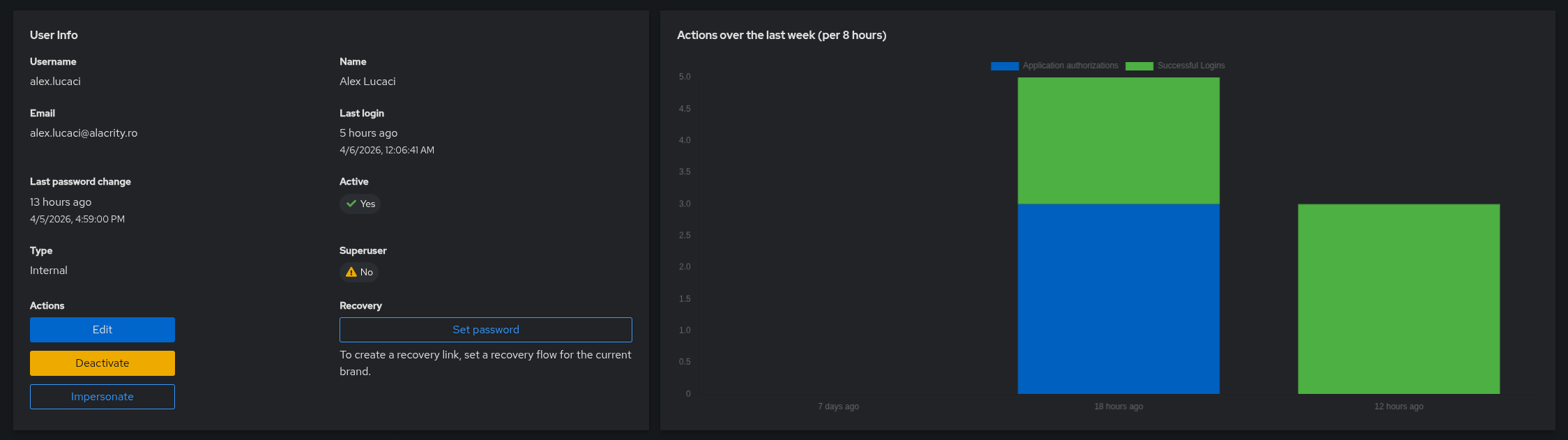
We do not create user accounts manually here. We only create them in Google Workspace, and by logging in here, their account is automatically added.
Users that should not have a Google Workspace account should have the user created directly in Authentik by the administrators.
Permissions
Giving users access to the resources they need is modelled around putting users in specific groups, and then assigning rights to these groups.
We have the following groups:
- Everyone - as the name says, everyone is added to this group. Everyone will have the rights given to this group. Assign sparingly.
- Volunteers - group aimed for Alacrity volunteers. They are added upon enrollment or manually.
- Board - group for Alacrity board and extended board. This group tipically has access to every resource. Members added manually only.
- Clockworks - group for Clockworks members coming from the LucaciResearch Authentik instance.
When designing permissions inside apps, one should not assume that these groups are a linear escalation of privileges. For example, a person might be a Board member but not a Volunteer (for example an accountant).
Wiki groups
Wiki.js has a full group-based permission system. When logging in, the wiki software syncsthe user's groups by reading the claims inside the JWT token. Currently the groups have configured the following permissions:
- Guest - Can read the wiki's public pages, but not on
/Board. - Everyone - Can read the wiki and leave comments, but not on
/Board. - Volunteers - Can read/write and leave comments, but not on
/Board. - Board - Can read/write and comment everywhere.
- Clockworks - unconfigured for now, no permissions.
Group configuration for permissions must be done as follows in the group page:
- Enable global content permissions for all place where the user must be able to access, regardless of page rules.
- Configure strict per-page access on the Page rules tab. More specific path rules have precedence, and deny takes precedence over allow for the same path.
- Create a catch-all allow rule for all actions (Path starts with
/) - Create deny rules for all pages or sections where the user must not be able to access.
- Create a catch-all allow rule for all actions (Path starts with
This mechanism requires the groups to exist already on Wiki.js side with the same name. If creating more groups in Authentik, also create on Wiki.js.
TODORework wiki permissions to work tag-based instead of path-based for mixed vilisiblity paths.
Google Workspace login
The google workspace integration handles account creation. it also deduces the username from the user's email address.
The OAuth source is configured as such:
- User matching mode: Link to a user with identical email address.
- Authentication flow:
default-source-authenticationas usual. - Enrollment Flow:
google-source-enrollment.
Users are automagically added to the Everyone group. They are asked if they are Volunteers, and if yes, they are added to the Volunteers group.
Flow google-source-enrollment
This flow is responsible with extracting the user's username from email address, configuring his account and saving settings to authentik database.
flowchart TD
    A["Pre-flow policies"]

    A -->|"Binding 0"| B[/"Policy (Expression Policy)<br/>Google Username From Email"\]
    A -->|"Binding 1"| C[/"Policy (Expression Policy)<br/>default-source-enrollment-if-sso"\]

    C --> F["Flow<br/>Google Enrollment"]

    F --> G(["Stage (User Write Stage)<br/>google-source-enrollment-write"])

    G --> H(["Stage (Prompt Stage)<br/>prompt-if-volunteer"])

    H --> I[/"Policy (Expression Policy)<br/>Add user to Everyone"\]
    H --> J[/"Policy (Expression Policy)<br/>Add user to Volunteers"\]

    I -->|"Policy passed"| K(["Stage (User Login Stage)<br/>google-source-enrollment-login"])
    J -->|"Policy passed"| K

    K --> N["End of the flow"]
    B --> |"Policy denied"| N
    C --> |"Policy denied"| N
    B --> |"Policy passed"| F
Short summary of the policies and stages:
default-source-enrollment-if-ssopolicy guards against non-sso users running this enrollment flow.Google Username From Emailpolicy sets the username (in prompt_data object) proactively by extracting the user's email address. It fails if the domain is notalacrity.ro.google-source-enrollment-writesimply writes the user to authentik's database.prompt-if-volunteerasks the user (Yes, No) if the user is a volunteer in Alacrity. It sets a booleanis_volunteeron theprompt_dataobject.google-source-enrollment-loginlogs in the current session to the newly written user. It is protected by two dummy policies that run before it:Add user to Everyoneadds the user to Everyone group.Add user to Volunteersadds the user to Volunteers group if theis_volunteerboolean is true.
Expression policy Google Username From Email
# Get email
email = request.context["prompt_data"]["email"]

# Set username to email without domain
request.context["prompt_data"]["username"] = email.split("@")[0]
alacrityro = email.split("@")[1]

if alacrityro != "alacrity.ro":
  return False

return True
Expression policy Add user to Volunteers
from authentik.core.models import Group

if request.context.get('prompt_data').get('is_volunteer'):

  pending_user = request.context.get("pending_user")
  group1 = Group.objects.get(name="Volunteers")
  group1.users.add(pending_user)

return True
Social Login Configuration
We offer users to connect their social accounts to the Alacrity Account. This allows them to login much more easily using the Discord or Github button on the login page, no need for typing passwords.
For a user to configure this, he needs to login on Authentik and go to Settings -> Connected services and press the Connect buttons on that page. He must NOT disconnect his Google Workspace account.
To achieve this, Authentik is configured in the following way:
Two social logins are added into Authentik. All settings are mostly default, only the enrollment flow is set as a dummy flow. The correct authentication flow is default-source-authentication. Users are linked using unique identifier, not based on email or other data.
- Github: enrolls using
github-deny-enrollment. Integration is owned by AlexL, pending transfer to github org. - Discord: enrolls using
discord-deny-enrollment. Integration is owned by AlexL, pending transfer to someone from Alacrity board.
To make the social login providers appear on the main login page, in the default-authentication-identification stage of the default-authentication-flow, in the Source settings section, both the Discord and Github sources must be added.
Flows github-deny-enrollment and discord-deny-enrollment
These flows will only run when the user tries to login with a social account that is not connected. They will show an error message and redirect the user to the wiki page with account setup.
The following Authentik resources are used by these flows:
- Prompts:
github-account-not-recognizeddiscord-account-not-recognized
- Stages:
Github account not recognizeduses thegithub-account-not-recognizedpromptDiscord account not recognizeduses thediscord-account-not-recognizedpromptRedirect to Social Login Setup Guideis used to redirect browser to wiki docs.
The structure of the flows looks like this:
flowchart LR
    A["Flow<br/>Github Deny Enrollment"] --> B(["Stage (Prompt Stage)<br/>Github account not recognized"])
    B --> C(["Stage (Redirect Stage)<br/>Redirect to Social Login Setup Guide"])
    C --> D["End of the flow"]
No policy bindings are necessary because an enrollment flow without a user write stage will not do the actual enrollment process.
Wiki links
Take care when moving pages in the wiki, to update the github-account-not-recognized and discord-account-not-recognized prompts with the right link:
For more information, visit the <a href="/account-setup">account wiki page</a>.
Also update the Redirect to Social Login Setup Guide stage with the right URL. This url is linked to the right section describing social account setup on the wiki.
LucaciResearch (Clockworks) Authentik
Members of Clockworks will be able to login on Alacrity resources using their already-existing LucaciResearch account.
This will be achieved by connecting the LucaciResearch Authentik to the Alacrity Authentik using OAuth. They will be able to both connect to an existing Alacrity account or register a new one with data sourced from LucaciResearch.
This integration is planned, but not yet implemented.
Edge cases
In this situations, recovery might be harder and/or require intervention from AlexL or Board.
Forgot password
Currently there is no way for users to self-service a forgot password. To reset their password, they must login to Authentik using their Google Workspace account, navigate to their Authentik account settings and change their password there.
Bricked account
Users are able to brick their account by doing all of the below:
- Change password to something they do not know
- Disconnect all of their social login connections
- Disconnect the Google Workspace connection
In this situation, the user must contact the administrators to set new password to the account, that will be transmitted to the user. It is highly recommended to reconnect at least his Google Workspace account and then change the password again.
In the future, we might implement a "Forgot my password" mechanism using email.