Firmware
The AirBox is a solar-powered air quality station that lives outdoors, unattended, on nothing more than a small battery and a solar panel - and the firmware's job is to make that possible.
On every measurement cycle it must follow a complex process to aquisition the data:
- Wake the ESP32 from deep sleep, decide whether conditions are safe for the air quality sensor (a DS18B20 probe guards the SEN66 against operating outside its −10…+50 °C range)
- Preheat the SEN66 long enough (5 minutes) for its gas readings to actually mean something, and only then take the sample: particulate matter, CO2, temperature, humidity, and the VOC/NOx raw readings.
Every one of those steps costs energy the panel has to earn back, so between cycles the firmware must take opportunities to go to sleep whenever possible. This yields us two different intervals of sleep:
- Wake up from deep sleep, verify the DS18B20 guard, enable the SEN66 measurement to start preheating and go to preheat sleep foir 5 minutes.
- Wake up from preheat sleep, Do all the measurement work and submit data, turn off sensors, then go back to deep sleep for 10 minutes.
Sleeping the CPU means completely turning it off for a specified amount of time. When the CPU wakes up, our program starts all the way from the beginning.
The provided airboxSleep function can be fed a sleep reason - a positive integer - that will be able to be verified using the airboxBegin counterpart that we call first thing in setup.
5mins (preheat sleep) + 10mins (deep sleep) + 1min (measurement headroom) = 16 mins
Our sensor will sample data at about 16 mins intervals.
The tricky parts — WiFi credentials management, the network upload, deep-sleep and the wake-reason mechanism — are wrapped in ready-made functions in airbox_net.h, so your sketch can focus on the measurement logic itself.
Sketch setup
Create a new arduino sketch for your AirBox firmware. Download near the .ino file the following headers from our repository:
In the config.h file you will have to enter an API key (works kinda like a password). We will provide this API Key to you in the second half of the day.
Data handling
You may have noticed that we have two sources for the temperature: DS18B20 and SEN66.
- We use the DS18B20 only as a safety gate to not engage the SEN66 sensor outside its working range (-10 .. +50). If the sensor reports -127 (meaning the sensor might be broken), we will consider this as a valid temperature and proceeed with it as a good reading.
- The temperature provided by SEN66 is more accurate and will be the final temperature reported.
Turning on or off the SEN66 sensor.
Transistor Q1 on the schematic is able to turn on or off the sensor's supply voltage to allow it to be turned off during deep sleep. By default, sensors are powered (line SENSOR_POWER is LOW by a pulldown resistor). To turn them off, write HIGH to SENSOR_POWER pin.
As per the code flow below, we will turn on the SEN66 when preheat period starts, and turn off the sensor after measurement is done.
Battery and Solar measurement
The ESP's ADC is a bit finnicky and we need to do a bit of configuration and data processing to get real battery and solar values.
In the hardware setup phase, configure ADC attenuation:
analogSetPinAttenuation(PIN_SENSE_BAT, ADC_11db);
analogSetPinAttenuation(PIN_SENSE_SOLAR, ADC_11db);
When reading a voltage, always discard the first reading (the ADC behaves erratically after reconfiguration) and measure 16 intervals, then calculate their average. Instead of the standard Arduino's analogRead, use analogReadMilliVolts (function documentation). Pseudocode:
analogReadMilliVolts() // discard
loop 16 times:
	sum <- sum + analogReadMilliVolts()

sum = sum / 16
Don't forget to multiply the raw ADC reading with the correct resistive divider ratio:
2.0for Battery
4.3for Solar Panel
graph LR
	READ["Read raw voltage using ADC<br>Average x16 samples"] --> RDIVMV["Adjust for resistive divider"] --> RDIV["Millivolts to Volts"]
  RDIV --> |Reading battery?| BAT[Apply Li-Ion correction curve]
  RDIV --> |Reading panel?| PAN[Verify if over 3.5V]
To detect if the solar panel receives sun (we'll need a boolean later - instead of a voltage) verify if the voltage is over 3.5V.
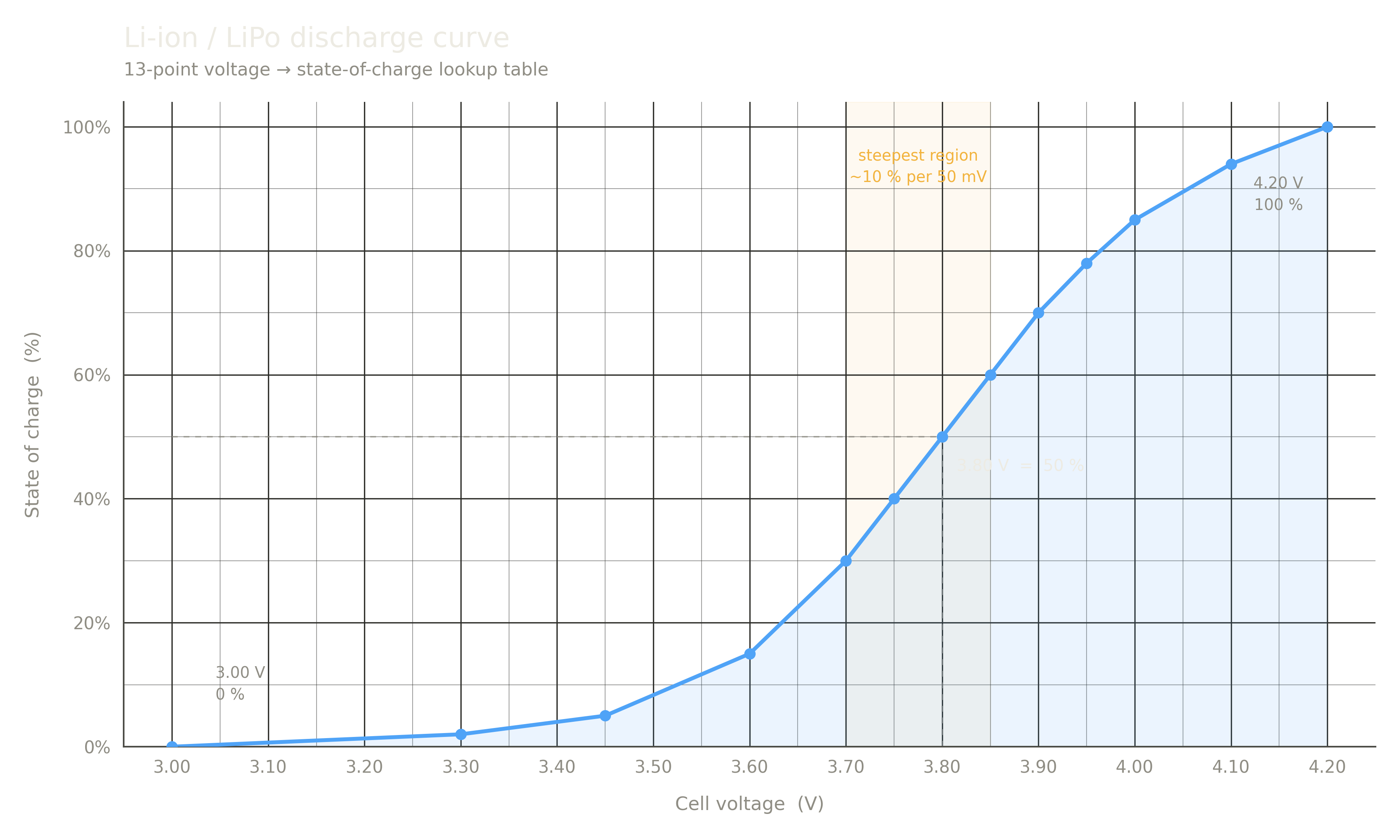
Furthermore, to translate from volts to battery state of charge, Li-ion batteries are not linear. To aid with processing, a mapping curve is needed.
You can use the pre-provided socFromVoltage() function. Feed it the voltage (caution: in Volts!) and it will give you back the percent of charge (0-100%).
SEN66's NOx and VOC measurement
SEN66's datasheet specified that the VOC and NOx index (compensated, calibrated) need 1 hours and respectively 3 hours of uninterrupted on-time to become accurate. Unfortunately, because our sensor must sleep unpowered every 15 minutes, we do not have this luxury.
To compensate, we will disregard the NOx and VOC Index measurement, and instead we will send NOx and VOC RAW values (also called ticks). Look up Sensirion's RAW readings example to find out how to read these values.
Sending a JSON string
JSON (JavaScript Object Notation) is a lightweight, text-based data interchange format used to store and transmit structured data. We will send to the airboxUpload() function a JSON string containing the following data and structure:
{
  "geohash": "...",
  "charge": 87.6
  "sun": false,
  "co2": 0
  "pm1": 0,
  "pm25": 0,
  "pm4": 0,
  "pm10": 0,
  "temp": 0,
  "hum": 0,
  "voc_raw": 0,
  "nox_raw": 0
}
To create such a string in C, create a char... buffer and write into it with fprintf:
sprintf(destination_buffer, "{ \"geohash\":\"%s\", \"temp\":\"%f.2\"}", geohash, temperature);
Look at this documentation for available placeholder formats for fprintf and for boolean flags use the ternary operator with string combination:
bool flag = true;
fprintf(destination_buffer, "Flag: %s\n", flag ? "true" : "false");
Spaces, alignment, newlines are completely meaningless in JSON. You can write it on a single line just fine.
Please note that the last field in the JSON doesNOThavbe a trailing,.
Allocate a buffer of at least 1000 characters for the json content.
After you are done with JSON formatting, pass it to the airboxUpload function.
Code Flow
graph TB
    START([PROGRAM START]) --> BEGIN["airboxBegin()<br> returns sleep_reason"]
    BEGIN --> HWSET["Hardware setup"]
    HWSET --> REASON{sleep_reason?}

    REASON -->|REASON_DEEP_SLEEP| TEMP{"DS18B20 temperatures OK?"}
    TEMP -->|temps ok| PWRON["Turn on sensor power and start measurement mode"]
    PWRON --> SLEEP5["Sleep 5 min<br>REASON_PREHEAT_SLEEP"]
    TEMP -->|temps bad| SLEEP15["Sleep 16 min - REASON_DEEP_SLEEP"]

    REASON -->|REASON_PREHEAT_SLEEP| M1

    subgraph Measurement
        M1["Turn off charging"] --> M2["Delay 1000 ms"]
        M2 --> M3["Measure SENSE_BAT and SENSE_SOLAR voltage"]
        M3 --> Mc["Turn on charging"]
        Mc --> Mw["Connect WiFi"]
        Mw --> M4["Measure SEN66 readings<br>(take RAW readings for NOx and VOC)"]
        M4 --> M5["Turn off sensor power"]
        M5 --> Mu["Wait WiFi Connect to finish<br>at most 20 seconds"]
        Mu --> M6["Construct JSON and upload<br>airboxUpload()"]
    end

    M6 --> SLEEP10["Sleep 10 min<br>REASON_DEEP_SLEEP"]

    SLEEP5
    SLEEP15
    SLEEP10

    classDef sleep fill:#dbeafe,stroke:#2563eb,color:#1e3a8a
    classDef decision fill:#4a2d05,stroke:#d97706,color:#fbbf24
    class SLEEP5,SLEEP15,SLEEP10 sleep
    class REASON,TEMP decision
Premade Function Definitions
This module contains functions that help with WiFi connection management, HTTPS upload to our server and sleep states.
To include it, add at the beginning the following section:
#include "airbox_net.h"
The API at a glance
Let's have a look at the functions available.
airboxBegin()
int airboxBegin();
This function handles verifying the reset button, if pressed gives information regarding the previous sleep cycle.
Return value: an integer, representing the wake reason.
-1if the CPU was freshly reset- a positive integer, representing the
sleepReasonthat is passed toairboxSleep()function, if waking from sleep.
We'll use the return value of this function to decide wether we deep sleep or sleep with the sensor live.
airboxBeginConnect()
void airboxBeginConnect();
Use this function to initiate connecting to WiFi. It uses the credentials stored in the flash memory of the ESP.
The function returns immeadetely and we can do other operations while WiFi is connecting.
airboxWaitConnected()
bool airboxWaitConnected(uint32_t milisecondsTimeout);
Wait until the WiFi is connected, up to a specific time. The functon blocks execution until WiFi is connected or the timer is up.
Return value: true if wifi is successfully connected, false if network fails.
airboxUpload()
bool airboxUpload(char * json);
This function uploads the constructed string JSON to the airbox.alacrity.ro server for storage and analysis.
Return values: true if upload was successful, false if upload failed.
airboxSleep()
void airboxSleep(uint32_t sleepDurationMs, int sleepReason);
This function puts the CPU to sleep for a specified time in milliseconds.
The second parameter must be a positive integer that is saved during sleep, and is extracted during wakeup sequence to find out what sequence the airbox will execute.
Return value: This function blocks indefinetely. Once the CPU is put to sleep, the moment it wakes up the program will be reset.
socFromVoltage()
float socFromVoltage(float voltage);
Calculate the percent of charge of the Li-Ion battery using the battery's charge curve - see graph above.
Return value: percent of charge (number between 0 and 100).
airboxGetGeohash()
void airboxGetGeohash(char * out, size_t outSize);
Copy the configured geohash to the supplied string buffer. Pass the length of the buffer to outSize so that the function knows not to write past the bounds of the buffer.
Big Hint 1 (program flow)
#include <DallasTemperature.h>
#include <OneWire.h>
#include <SensirionI2cSen66.h>
#include <Wire.h>

#include "config.h"
#include "pins.h"
#include "debug.h"
#include "airbox_net.h"


#define REASON_DEEP 11
#define REASON_PREHEAT 22

bool doCheckSafetyTemperature() {
  // Wait 300ms before probe reading to allow the probe to start properly.
  // return true if temperature is OK or sensor broken, else return false.
}

void enableSen66Sensor() {
  // enable the SEN666 sensor!
  // after you turn on power, please wait a few milliseconds (100-300) before the first sensor command!
}

void doMeasure() {
  // do a full measurement cycle.
}

void setup() {
  int reason = airboxBegin();

	// Any more hardware initialization you need (i2c begin, probe begin)

  if (reason == -1 || reason == REASON_DEEP) {
    bool res = doCheckSafetyTemperature();
    if (res) {
      enableSen66Sensor();  // enable sensor and go to preheat sleep
      airboxSleep(5 * 60 * 1000, REASON_PREHEAT);
    } else airboxSleep(10 * 60 * 1000, REASON_DEEP); // temps are bad, go to deep sleep.
  }

  if (reason == REASON_PREHEAT) {
    doMEasure();
    airboxSleep(10 * 60 * 1000, REASON_DEEP);
  }
}

void loop() {
  // nothing
}
(VERY) BIG HINT 2 (a few more instructions for manipulating sensors)
// Big Hint 2 (measurement details)

#include <DallasTemperature.h>
#include <OneWire.h>
#include <SensirionI2cSen66.h>
#include <Wire.h>

#include "config.h"
#include "pins.h"
#include "debug.h"
#include "airbox_net.h"

#define REASON_DEEP 11
#define REASON_PREHEAT 22

// The sensors we talk to: the DS18B20 probe sits on its own 1-wire bus,
// the SEN66 is on the I2C bus.
OneWire oneWire(PIN_DS18B20);
DallasTemperature probe(&oneWire);
SensirionI2cSen66 sen66;

// everything we measure, in one place, so each function can fill in its part
// and buildJson() can read all of it at the end.

float batteryVolts, solarVolts, chargePercent;
bool sunOut; //bool cause it's either yes or no
float pm1, pm25, pm4, pm10, temperature, humidity; //datatypes according to Sensirion's spec...visit spec manual/datasheet if you want to check
uint16_t co2, vocRaw, noxRaw;

// The JSON we upload gets written into this buffer
char json[1000];

void hardwareInit() {
  // airboxBegin() already configured the sensor power pin and the setup
  // button, do not touch those here.

  // The charge disable pin controls the battery charger: LOW means the
  // battery charges normally; it is only raised for a moment during the
  // battery measurement.
  pinMode(PIN_CHR_DISABLE, OUTPUT);
  digitalWrite(PIN_CHR_DISABLE, LOW);

  // ADC configuration for the two voltage measurement pins (see wiki).
  // Why the attenuation: on its own the ESP32 ADC can only measure small
  // voltages, up to about 1V, anything above that just reads as maximum.
  // The attenuator weakens the incoming signal by a known factor before it
  // is measured, so with 11db the ADC can read up to about 2.5V at the pin.
  // We need that: a full battery is 4.2V and its divider halves it, which
  // still leaves 2.1V at the pin, way over the bare 1V limit.
  analogSetPinAttenuation(PIN_SENSE_BAT, ADC_11db);
  analogSetPinAttenuation(PIN_SENSE_SOLAR, ADC_11db);

  Wire.begin((int)PIN_I2C_SDA, (int)PIN_I2C_SCL);
  probe.begin();
}

bool doCheckSafetyTemperature() {
  delay(300);  // let the probe start up properly before we ask it anything
  probe.requestTemperatures();
  float t = probe.getTempCByIndex(0);
  Serial.printf("Guard temperature: %.2f C\n", t);

  // A reading of -127 means the probe did not answer (broken or unplugged) as we saw yesterday
  // We decided to treat that as a good reading and carry on anyway (no reason to disrupt the whole program if only the probe is fucked, we'll handle the probe temperature on the serverside)
  //
  // TODO: return true when t is inside the SEN66 working range (-10 to +50)
  //       or when the probe looks broken. Return false otherwise.
  return false;
}

void enableSen66Sensor() {
  digitalWrite(PIN_SENSOR_POWER, LOW);  // transistor Q1 opens, sensors get 3.3V
  delay(200);  // the SEN66 needs a moment after power up before any command
               // you can try values from 200ms to 500ms, see what works best for you
               // see Sensirion's manual if you want confirmation of why this works

  sen66.begin(Wire, SEN66_I2C_ADDR_6B);
  sen66.startContinuousMeasurement();
  // From here the SEN66 measures on its own. It stays powered through the
  // preheat sleep because airboxSleep() keeps the power pin as we left it,
  // so by the time we wake up the gas readings had time to settle.
}

// Read one voltage pin the way the wiki describes: throw away the first
// sample (the ADC misbehaves right after configuration), then average 16
// samples. Returns the voltage AT THE PIN, in volts. The caller still has
// to multiply by the resistive divider ratio.
float readVoltageAverage(uint8_t pin) {
  analogReadMilliVolts(pin);  // discard
  uint32_t sum = 0;
  for (int i = 0; i < 16; i++) {
    sum += analogReadMilliVolts(pin);
  }
  return (sum / 16) / 1000.0;  // average, then millivolts to volts
}

void measureBatteryAndSolar() {
  // Pause charging while we measure, otherwise the charger pushes the
  // battery voltage up and the reading lies to us.
  digitalWrite(PIN_CHR_DISABLE, HIGH);
  delay(1000);  // give the battery a moment to settle

  batteryVolts = readVoltageAverage(PIN_SENSE_BAT) * 2.0;  // divider ratio
  chargePercent = socFromVoltage(batteryVolts);

  // TODO: read the solar voltage into solarVolts the same way.
  //       Careful, the solar divider ratio is different (see wiki).
  // TODO: set sunOut to true when the solar voltage is over 3.5V.

  digitalWrite(PIN_CHR_DISABLE, LOW);  // resume charging
  Serial.printf("Battery: %.2f V (%.0f%%)\n", batteryVolts, chargePercent);
}

void readSen66Values() {
  uint16_t rawPm1, rawPm25, rawPm4, rawPm10, rawCo2;
  int16_t rawHum, rawTemp, rawVoc, rawNox;
  sen66.readMeasuredValuesAsIntegers(rawPm1, rawPm25, rawPm4, rawPm10, rawHum,
                                     rawTemp, rawVoc, rawNox, rawCo2);

  // The sensor hands us integers, we have to scale them to real units:
  //   pm values    -> divide by 10
  //   humidity     -> divide by 100
  //   temperature  -> divide by 200
  //   co2 is already in ppm, no scaling
  pm1 = rawPm1 / 10.0;
  co2 = rawCo2;
  // TODO: same idea for pm25, pm4, pm10, humidity and temperature.

  // rawVoc and rawNox above are the INDEX values. We do not use those, we
  // send the raw ticks instead and the server computes the index for us
  // (the wiki explains why).
  //
  // TODO: call sen66.readMeasuredRawValues(...) and keep the voc and nox
  //       ticks in vocRaw and noxRaw. Look up Sensirion's raw readings
  //       example to see what arguments it wants.
}

void buildJson() {
  char geohash[101];
  airboxGetGeohash(geohash, sizeof(geohash));

  // %s prints a string, %.1f prints a number with one decimal, %u prints a
  // whole number. There is no placeholder for booleans, use the ternary
  // trick from the wiki to print the words true/false.
  snprintf(json, sizeof(json),
           "{\"geohash\":\"%s\",\"charge\":%.1f,\"sun\":%s}",
           geohash, chargePercent, sunOut ? "true" : "false");
  // TODO: extend the format string with co2, pm1, pm25, pm4, pm10, temp,
  //       hum, voc_raw and nox_raw. Mind the commas between fields, and
  //       remember there is NO comma after the last one.

  Serial.printf("Payload: %s\n", json);
}

void doMeasure() {
  // Battery first: it has to be measured while the radio is still off,
  // WiFi draws enough current to drag the voltage down.
  measureBatteryAndSolar();

  // Start WiFi now. The function returns right away and the connection
  // happens in the background while we talk to the SEN66.
  airboxBeginConnect();

  readSen66Values();
  digitalWrite(PIN_SENSOR_POWER, HIGH);  // data is in, sensors can power down

  buildJson();

  if (airboxWaitConnected(20 * 1000)) {
    airboxUpload(json);
  }
  // If WiFi did not connect we simply skip this upload and the reading is
  // lost. Not great, but the next cycle starts in a few minutes anyway.
}

void setup() {
  // Must stay the very first line, before anything touches a pin
  // see wiki for why
  int reason = airboxBegin();

  hardwareInit();

  if (reason == -1 || reason == REASON_DEEP) {
    bool res = doCheckSafetyTemperature();
    if (res) {
      enableSen66Sensor();  // enable sensor and go to preheat sleep
      airboxSleep(5 * 60 * 1000, REASON_PREHEAT);
    } else airboxSleep(10 * 60 * 1000, REASON_DEEP);  // temps are bad, go to deep sleep.
  }

  if (reason == REASON_PREHEAT) {
    doMeasure();
    airboxSleep(10 * 60 * 1000, REASON_DEEP);
  }
}

void loop() {
  // nothing
}
What Big Hint 2 expected from you
Big Hint 2 handed you the working skeleton: hardware setup, the DS18B20 read, the SEN66 power-up sequence, and the battery measurement done end to end as a worked example. Four TODOs were left for you. This is what each one was supposed to become.
1. The safety temperature decision
doCheckSafetyTemperature() already reads the probe into t. Your job was the decision:
- temperature between -10 and +50: the SEN66 is safe to run, return
true; - a reading of about -127: the probe did not answer, it is broken or unplugged. We decided to trust the station anyway and treat this as a good reading, so return
true; - anything else: too cold or too hot, return
falseand the station goes back to sleep without touching the SEN66.
Careful with the order of the checks: -127 is also "below -10", so test for the broken probe before (or together with) the range test, otherwise a broken probe gets rejected by the range check and your station never measures again.
2. Solar voltage and the sun flag
A mirror of the battery lines right above the TODO, with two changes:
- the solar divider ratio is 4.3, not 2.0 (different resistors on the board);
- there is no charge curve for a panel. Instead, set
sunOuttotruewhen the solar voltage is over 3.5V.
The charging pause and the 16-sample averaging were already handled for you, so this is two lines.
3. Finishing the SEN66 scaling
The sensor sends whole numbers to keep its messages small, so every value arrives multiplied. You had the rule in a comment and pm1 as the example:
- pm values: divide by 10
- humidity: divide by 100
- temperature: divide by 200
- co2 needs no scaling, it is already in ppm
Divide by 10.0 (with the decimal point), not 10. Dividing two integers in C throws away the decimals, so 247 / 10 is 24, while 247 / 10.0 is 24.7.
4. The raw VOC/NOx ticks
The rawVoc and rawNox you get from readMeasuredValuesAsIntegers() are index values, and we do not send those (the index needs hours of uninterrupted running to mean anything, and our station sleeps every few minutes). The ticks come from a second library call, readMeasuredRawValues(), and the server computes the index from them on its side, where nothing ever sleeps.
The task was to find that call in Sensirion's raw readings example, call it, and keep the voc and nox ticks in vocRaw and noxRaw. If you did not manage to dig it up, Big Hint 3 shows it in full.
5. The JSON payload
buildJson() gave you the start of the format string with three fields. You were supposed to extend it to all twelve fields from the wiki page: geohash, charge, sun, co2, pm1, pm25, pm4, pm10, temp, hum, voc_raw, nox_raw.
The rules that bite people:
- every field is
"name":value, with a comma between fields and no comma after the last one; - the field names go in quotes, and in a C string a quote is written as
\"; %.1ffor the decimal numbers,%ufor whole numbers like co2 and the ticks, and the ternary trick forsun;- the arguments after the format string must be in exactly the same order as the placeholders.
The sketch prints the payload to serial before uploading. Copy that line into an online JSON validator (search "jsonlint"). If the validator complains, the server will too.
Big Hint 3
// Big Hint 3 (raw gas ticks)

#include <DallasTemperature.h>
#include <OneWire.h>
#include <SensirionI2cSen66.h>
#include <Wire.h>

#include "config.h"
#include "pins.h"
#include "debug.h"
#include "airbox_net.h"

#define REASON_DEEP 11
#define REASON_PREHEAT 22

// DS18B20 on its own 1-wire bus, SEN66 on the I2C bus.
OneWire oneWire(PIN_DS18B20);
DallasTemperature probe(&oneWire);
SensirionI2cSen66 sen66;

// everything we measure in one place, buildJson() reads it all at the end
float batteryVolts, solarVolts, chargePercent;
bool sunOut;  // bool cause it's either yes or no
float pm1, pm25, pm4, pm10, temperature, humidity;  // datatypes according to Sensirion's datasheet
uint16_t co2, vocRaw, noxRaw;

// The JSON we upload gets written into this buffer
char json[1000];

void hardwareInit() {
  // Sensor power pin and setup button are already handled by airboxBegin().

  // Charger control pin: LOW means the battery charges normally.
  pinMode(PIN_CHR_DISABLE, OUTPUT);
  digitalWrite(PIN_CHR_DISABLE, LOW);

  // The bare ADC only reads up to about 1V; 11db attenuation stretches that
  // to about 2.5V, enough for the divided battery voltage (2.1V at the pin).
  analogSetPinAttenuation(PIN_SENSE_BAT, ADC_11db);
  analogSetPinAttenuation(PIN_SENSE_SOLAR, ADC_11db);

  Wire.begin((int)PIN_I2C_SDA, (int)PIN_I2C_SCL);
  probe.begin();
}

bool doCheckSafetyTemperature() {
  delay(300);  // let the probe start up before we ask it anything
  probe.requestTemperatures();
  float t = probe.getTempCByIndex(0);
  Serial.printf("Guard temperature: %.2f C\n", t);

  // -127 means the probe did not answer; we still treat that as a good reading.
  // TODO: return true when t is in the SEN66 range (-10 to +50) OR the probe
  //       looks broken, false otherwise.
  return false;
}

void enableSen66Sensor() {
  digitalWrite(PIN_SENSOR_POWER, LOW);  // transistor Q1 opens, sensors get 3.3V
  delay(200);  // the SEN66 needs a moment after power up before any command

  sen66.begin(Wire, SEN66_I2C_ADDR_6B);
  sen66.startContinuousMeasurement();
  // The power stays on through the preheat sleep, so the SEN66 keeps
  // measuring while the CPU is off and its gas readings settle.
}

// Discard one sample, then average 16. Returns volts AT THE PIN, the caller
// still multiplies by the divider ratio.
float readVoltageAverage(uint8_t pin) {
  analogReadMilliVolts(pin);  // discard
  uint32_t sum = 0;
  for (int i = 0; i < 16; i++) {
    sum += analogReadMilliVolts(pin);
  }
  return (sum / 16) / 1000.0;  // millivolts to volts
}

void measureBatteryAndSolar() {
  // Pause charging so the charger does not push the battery reading up.
  digitalWrite(PIN_CHR_DISABLE, HIGH);
  delay(1000);

  batteryVolts = readVoltageAverage(PIN_SENSE_BAT) * 2.0;  // divider ratio
  chargePercent = socFromVoltage(batteryVolts);

  // TODO: read solarVolts the same way (different divider ratio, see wiki),
  //       then set sunOut to true when it is over 3.5V.

  digitalWrite(PIN_CHR_DISABLE, LOW);  // resume charging
  Serial.printf("Battery: %.2f V (%.0f%%)\n", batteryVolts, chargePercent);
}

void readSen66Values() {
  uint16_t rawPm1, rawPm25, rawPm4, rawPm10, rawCo2;
  int16_t rawHum, rawTemp, rawVoc, rawNox;
  sen66.readMeasuredValuesAsIntegers(rawPm1, rawPm25, rawPm4, rawPm10, rawHum,
                                     rawTemp, rawVoc, rawNox, rawCo2);

  // Scaling: pm divide by 10, humidity by 100, temperature by 200,
  // co2 is already in ppm.
  pm1 = rawPm1 / 10.0;
  pm25 = rawPm25 / 10.0;
  co2 = rawCo2;
  // TODO: same idea for pm4, pm10, humidity and temperature.

  // rawVoc/rawNox above are the index values, we ignore those. The raw ticks
  // come from a second call; the server turns ticks into an index for us.
  int16_t tickHum, tickTemp;
  uint16_t tickVoc, tickNox, tickCo2;
  sen66.readMeasuredRawValues(tickHum, tickTemp, tickVoc, tickNox, tickCo2);
  vocRaw = tickVoc;
  noxRaw = tickNox;
}

void buildJson() {
  char geohash[101];
  airboxGetGeohash(geohash, sizeof(geohash));

  // %s = string, %.1f = number with one decimal, %u = whole number,
  // booleans with the ternary trick from the wiki.
  snprintf(json, sizeof(json),
           "{\"geohash\":\"%s\",\"charge\":%.1f,\"sun\":%s,\"co2\":%u}",
           geohash, chargePercent, sunOut ? "true" : "false", co2);
  // TODO: extend with pm1, pm25, pm4, pm10, temp, hum, voc_raw and nox_raw.
  //       Commas between fields, NO comma after the last one.

  Serial.printf("Payload: %s\n", json);
}

void doMeasure() {
  // Battery first, while the radio is off (WiFi drags the voltage down).
  measureBatteryAndSolar();

  // Returns right away; WiFi connects in the background while we work.
  airboxBeginConnect();

  readSen66Values();
  digitalWrite(PIN_SENSOR_POWER, HIGH);  // data is in, sensors can power down

  buildJson();

  if (airboxWaitConnected(20 * 1000)) {
    airboxUpload(json);
  }
  // If WiFi did not connect this reading is lost, the next cycle retries.
}

void setup() {
  int reason = airboxBegin();  // must stay the very first line

  hardwareInit();

  if (reason == -1 || reason == REASON_DEEP) {
    bool res = doCheckSafetyTemperature();
    if (res) {
      enableSen66Sensor();  // enable sensor and go to preheat sleep
      airboxSleep(5 * 60 * 1000, REASON_PREHEAT);
    } else airboxSleep(10 * 60 * 1000, REASON_DEEP);  // temps are bad, go to deep sleep.
  }

  if (reason == REASON_PREHEAT) {
    doMeasure();
    airboxSleep(10 * 60 * 1000, REASON_DEEP);
  }
}

void loop() {
  // nothing
}
How to approach Big Hint 3 and onwards
Big Hint 3 is Big Hint 2 with shorter comments and a little more filled in: the raw ticks call, one more scaling line, and co2 added to the JSON so you can see %u in action. Everything else still says TODO, and that is on purpose. The remaining pieces (the safety decision, the solar side, the rest of the scaling, the rest of the JSON) are the actual exercise, and no hint is going to hand them over whole.
The way to use each new hint:
- Compare, do not replace. Put the hint next to your sketch and look for what changed since the previous hint. That difference is the nudge.
- Take only what you were stuck on. If your version of a function already works, keep yours, even if it looks different from the hint. Working code you understand beats hint code you pasted.
- One TODO at a time, then test. Flash after every piece and watch the serial monitor. The sketch already prints the guard temperature, the battery voltage and the payload, so each step has something you can check with your own eyes.
- Believe the printouts, not the code. A battery at 380% or a temperature of 6800 degrees means a divider ratio or a scale factor is missing. The numbers tell you which function to reread.
Milestones to check off, in order: a sensible guard temperature on serial, a believable battery voltage and percentage, a payload line that passes the JSON validator, airboxUpload() returning true, and finally your station's data showing up on the dashboard. When all five are there, you are done.
If you are stuck on the same TODO for a long time and the current hint did not help, ask an instructor. That is what we are here for.